Meta Ray-Ban Display's first major OS update is rolling out this month, bringing a new app, two new minigames, a widgets system, and more.
The $800 HUD glasses became available to purchase in the US, for those able to secure an in-person demo slot at physical retailers at least, back in October. And in early January, Meta added a Teleprompter app and started rolling out an early access feature allowing you to finger-swipe letters to enter text, detected by the Meta Neural Band. But beyond this, the OS itself remained unchanged.
 Ian Hamilton
This month, Meta is rolling out what's arguably the first major OS update – though notably the OS does not yet have an official publicly disclosed name.
The update brings, two new EMG-controlled minigames, an Instagram Reels feed, widgets, a Calendar app, live captions for phone calls, and more.
New Minigames: GOAT & 2048
Meta Ray-Ban Display shipped with one minigame: Hypertrail. In Hypertrail, you use the Meta Neural Band directional finger swipe gestures to slide a ball on a very simple top-down 2D level left, right, up, or down, with the ball sliding until it hits a wall – or enemy – each time. The enemies follow a looping movement path, and the goal is to guide a ball to the victory point for each level. It's broadly similar to the smartphone game Tomb of the Mask, though much more basic.
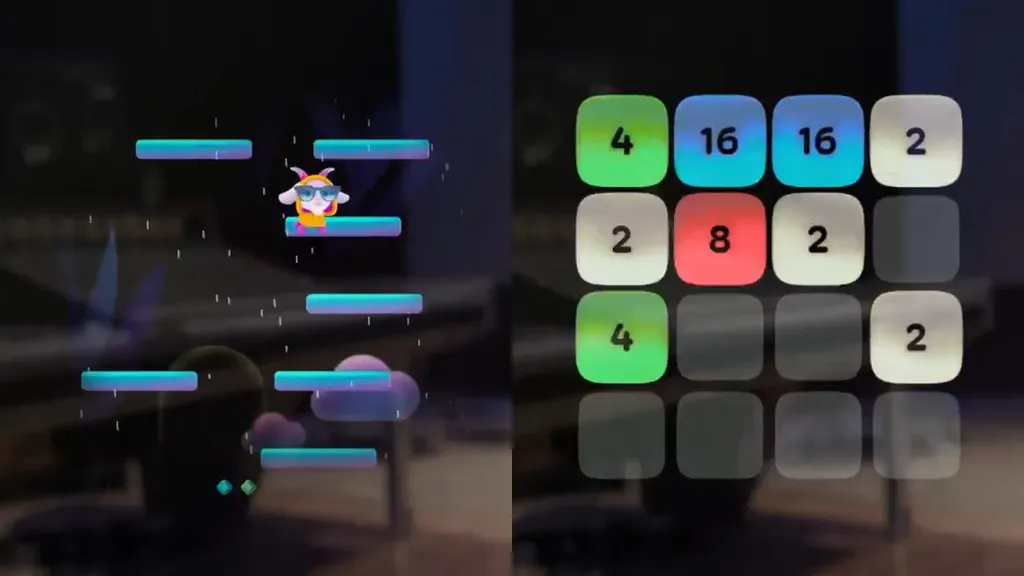
With the new OS update, two new games have been added, GOAT and 2048.
GOAT and 2048 on Meta Ray-Ban Display.
GOAT is essentially a simplified version of the famous smartphone game Doodle Jump. You tap your index finger to your thumb to make the goat jump, and swipe left or right to move, with the goal of getting as high as possible without falling off platforms. The basic platforms just move left to right, while harder ones will crumble within seconds of being landed on, and some provide a vertical boost. All very familiar, if you've played Doodle Jump before.
Meanwhile, 2048 is a port of the popular free and open-source puzzle game, wherein you slide numbered tiles to combine them with the goal of making the number 2048.
Instagram Reels
Since launch, the Instagram app on Meta Ray-Ban Display has presented a list of your ten most recent direct message threads. Within these, you could watch received Reels.
With the new OS update, the Instagram app opens to the same kind of Reels feed you get in the center tab of the Instagram smartphone app, or the Horizon OS app.
You scroll Reels by swiping your thumb down against the side of your index finger, and you can double tap your index finger to your thumb to like the Reel, or tap once to open a menu where you can send it to a friend.
You can still access your direct message threads by performing the back gesture.
Widgets & Live Activity Space
Arguably the most significant change to the OS structure itself is the addition of widgets.
As we described in our review, the interface has three main tabs:
• The center home tab (the default) shows the date and time, your notifications, and a Meta AI button, with tiny shortcuts to active audio or navigation at the top.
• The right tab is the two-column applet library: WhatsApp, Instagram, Messenger, Messages, Calls, Camera, Music, Photos, Captions, Maps, Tutorials, and a game called Hypertrail. Four rows are shown at a time, and you navigate vertically to see the rest.
• The left tab features quick controls and settings like volume, brightness, Do Not Disturb, as well as shortcuts to Captions, Camera, and Music.
The new widgets appear not as a fourth horizontal tab, but instead as a new space vertically above the center tab.
Right now there are four widgets: Reminders, Calendar events, Weather, and Stocks. They're visually similar to what you'd get on other operating systems with widgets, such as smart watches and smartphones.
Live activities such as playing music and navigation also appear in this new top vertical space.
Calendar App
Since August, Meta AI on all Ray-Ban and Oakley smart glasses has been able to access your Google Calendar and Outlook Calendar, if you connect it, meaning the assistant can verbally provide answers about your events and schedule, as well as add new events when you ask.
 David Heaney
With the new OS update for Meta Ray-Ban Display, there's now a dedicated Calendar app in the HUD to privately visually view your schedules and the details of events.
Phone Call Live Captions
Since launch, Meta Ray-Ban Display has been able to show live captions for the person you're looking at in the physical world, and even to translate between English, Spanish, French, or Italian.
With the new update, you can also enable live captions for the incoming audio on phone calls. This could be helpful if you're in a noisy environment where it's difficult to hear the other person.
Spotify "Soundtrack Your World"
Meta and Spotify have partnered to deliver a feature wherein Meta AI picks a matching song based on what you're currently looking at in the real world.
You can trigger the Soundtrack feature by saying "Hey Meta, play a song to match this view".
Meta says you can look at any scene, such as a sunset, album cover or concert poster.